SLR Light Meter for Film Photography
Through-the-Lens Light Metering
When you look through the viewfinder of a 35mm film camera with a through-the-lens (TTL) light meter, you will see the meter to the side or bottom of the frame. You will set your aperture according to the depth of field you desire or the shutter speed if motion photography is the result. As you adjust the aperture or shutter, look through the camera viewfinder and half-press the shutter release – it will reveal the TTL system. Your light meter may look slightly different than the illustrated sample below, but the process is still the same. The light meter will commonly be along the lines of the following:
- As depicted below, a range of shutter speeds with LEDs indicating shutter and aperture. Match up the two lights for a solid exposure.
- A similar version of the previous but with a moving needles instead of LEDs.
- A zero surrounded by a plus sign (over exposure) or minus sign (under exposure). Light up the zero sign for a solid exposure.
- An expanded version of the previous system but with a full scale from plus to minus.
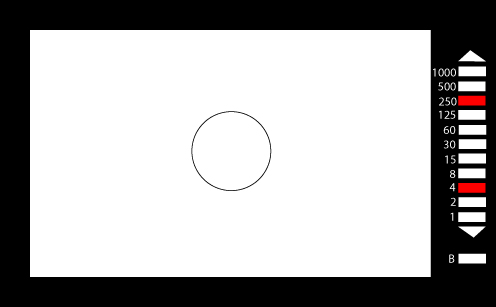
With the metering system, one light (or needle) will indicate your shutter speed while the other indicates the aperture. You must simply choose the shutter speed or aperture you wish to use and then change the settings of the other so that the red lights (or needles) match up with each other. From this point, you can also change the aperture settings one or two stops for underexposure and overexposure. Overexposure is particularly helpful with winter photography.
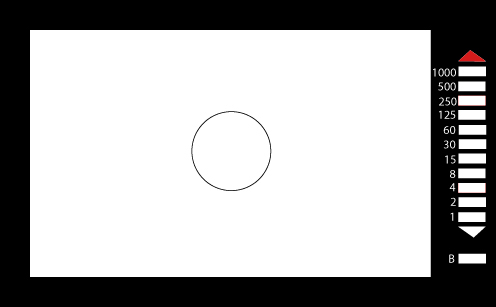 TTL light metering is seriously flawed when conditions are extremely bright (beach and winter photography) or extremely dark (night photography). Because a TTL metering system is limited to the apertures and shutter speeds of your film camera, you will likely encounter times when you do not have a slow enough or fast enough shutter speed to correctly expose the film. When this happens, the arrows of the TTL meter will light up, indicating that you need to raise or lower your settings accordingly. This will, of course, affect depth of field and motion as you compensate to lower or raise the aperture or shutter speed.
If your 35mm film camera has an Auto shutter speed setting, or aperture-priority, you can still expose when the light meter is above or below the extremes. As this means you are relying completely on the camera to make the right choices, this would not be recommended, but it can be done. For the best light meter readings in extreme conditions, it would be advised that you purchase a handheld light meter to measure accordingly.